Cómo optimizar tus imágenes para mejorar el rendimiento de tu plataforma de formación
Foxize coorganiza la jornada EdTech del Tech Spirit Barcelona
In a previous post we explained the importance of the performance of our website for the retention and subsequent conversion of users. Performance can be affected by a number of factors, one of which (and most important) is content load. As you already know, in your Foxize Cloud platform you can personalize your school with images that represent your look and feel: on the home page, in the featured banners, in the courses ... If these images are large and heavy, they will take time to load, especially for those people who have a slow internet connection, and that will affect the user experience.
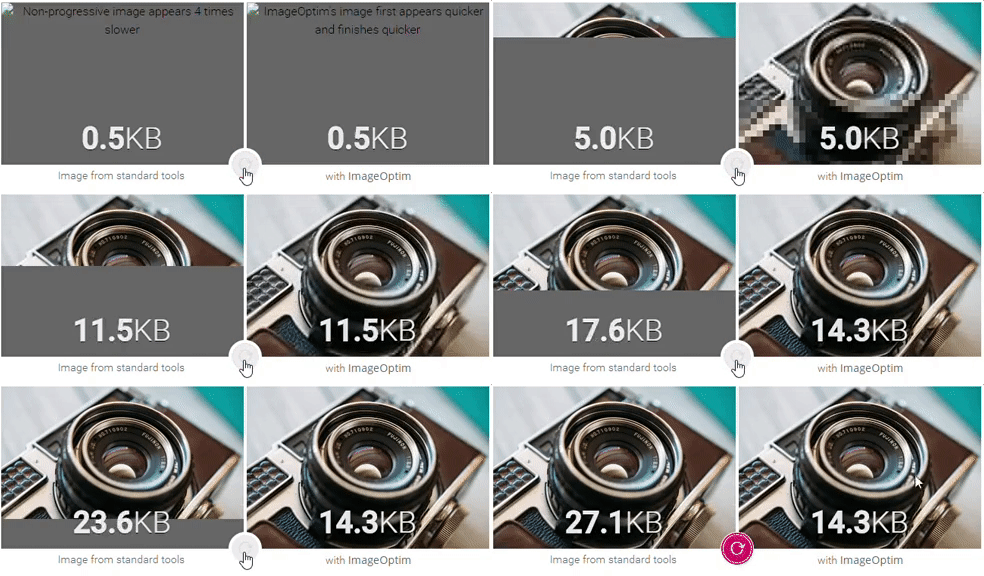
Loading time comparison between a non-optimized photo and an optimized one. From ImageOptim.
Can you imagine entering an online school and finding the image on the left? More than 50% of users would leave the page after 3 seconds for this reason.
Remember that the quality of the images also affects the quality of your web page. Having pixilated or low-quality images shows little professionalism and causes rejection to users. On the other hand, the loading speed also affects SEO, your website's positioning and the indexing of images in search engines such as Google.
If you don't want this to happen, we recommend optimizing your images so that your platform performs well. Next, we give you a series of tips and tools for this.
Image format
- GIF: this format is almost obsolete, since it is very heavy. It is only used for animated images.
- PNG: maintains transparency as the GIF format and does not compress images, so it has higher quality, although it may weigh more. PNG works well for logos or icons. It has the interlacing option, which will make the image load in different phases instead of jerky (as we have seen in the previous gif).
- JPG: this format compresses the images so that they weigh less, so it can have quality loss. In some cases we can choose the compression level. It is ideal for photographs or images with many colors. You also have the option of progressive, which will load the web in layers of different quality, instead of in pieces.
Image size
- Header of the web at home: the image is responsive, so a large image size will be necessary but optimized so as not to affect the loading time of the page. In the event that you don't like how it is shown on mobile screens, you have the option of adding a different image.
- Banner of the home with login: the images for highlights on desktop must be 750px wide x 330px high. In this case, the images are not responsive, so you must upload a mobile version with 346px width x 152px height.
- Testimonials at home: the image is 1,140px wide x 450px high.
- Thematic block of the courses in the home module: this space is designed to upload icon-like images that represent the themes of the courses to be offered. The size of the images is 90px x 90px.
- Courses: the size of the course images is 262px wide x 167px high.
Programs and tools to optimize images
In general, for the best performance of our training platform, the images that we upload to our website should have a weight below 1MB. We must find a balance between the size of the images and the quality.
We can optimize our images in editing programs such as Photoshop or its free alternative Gimp, which offer us the option to save for the web. This will allow us to edit a series of characteristics to optimize the images as much as possible.
You can also use programs and web services specifically created to optimize images for the web. These are our recommendations:
- Compressor.io: Reduces the weight of the image without reducing its quality. It supports four types of format: JPEG, PNG, GIF and SVG. Allows you to optimize images with or without loss of quality (only for JPEG and PNG this last option). It has a very useful previewer to be able to compare the before and after compression.
- Image Resizer: this website allows you to compress JPEG and PNG to reduce their weight. Compression options are limited, but the web also offers other free services for editing your images, such as scaling and cropping.
- FileOptimizer: free and open source program for windows that allows you to optimize a wide variety of formats.
- ImageOptim: the alternative to FileOptimizer for mac users, free and open source. Compress images without loss of quality, eliminating metadata.
- Trimage: free open source program for Linux and Ubuntu users, capable of optimizing PNG and JPEG images.
Don't you have your own training platform yet? Try Foxize Cloud 1 month for free or request a personalized demo.