OpenShot: tu nuevo editor de vídeos para tus cursos online
Crea tu escuela online en pocos minutos con Foxize LMS
We would like to recommend our favorite free and open-source editing tool, so that you can start creating your e-learning videos and populate your training platform with quality online courses.
It is OpenShot, a free and Open Source software created in 2008 by Jonathan Thomas, with the aim of creating a free and simple video editor for Linux, although for a few years it has also been available for Windows and Mac. It has been awarded with 8 awards, including "Most Revolutionary Application" in 2011 and "Video-Editing Tech Award" in 2018.
7 reasons to use OpenShot as a video editor
In the market we can find several free and Open Source video editing tools… So why do we recommend OpenShot? These are our reasons.
It's Open Source
You may have heard of the term Open Source, but maybe you're not sure what it means. Open Source software means that anyone has access to the program and its code, and can share and modify it to make new versions or improvements, or adapt it to their needs.
This means that, although the original creator and developer of OpenShot is a single person, it is a tool supported by a large community of developers who work every day to improve the tool, of their own free will and without profit.
Simple and intuitive
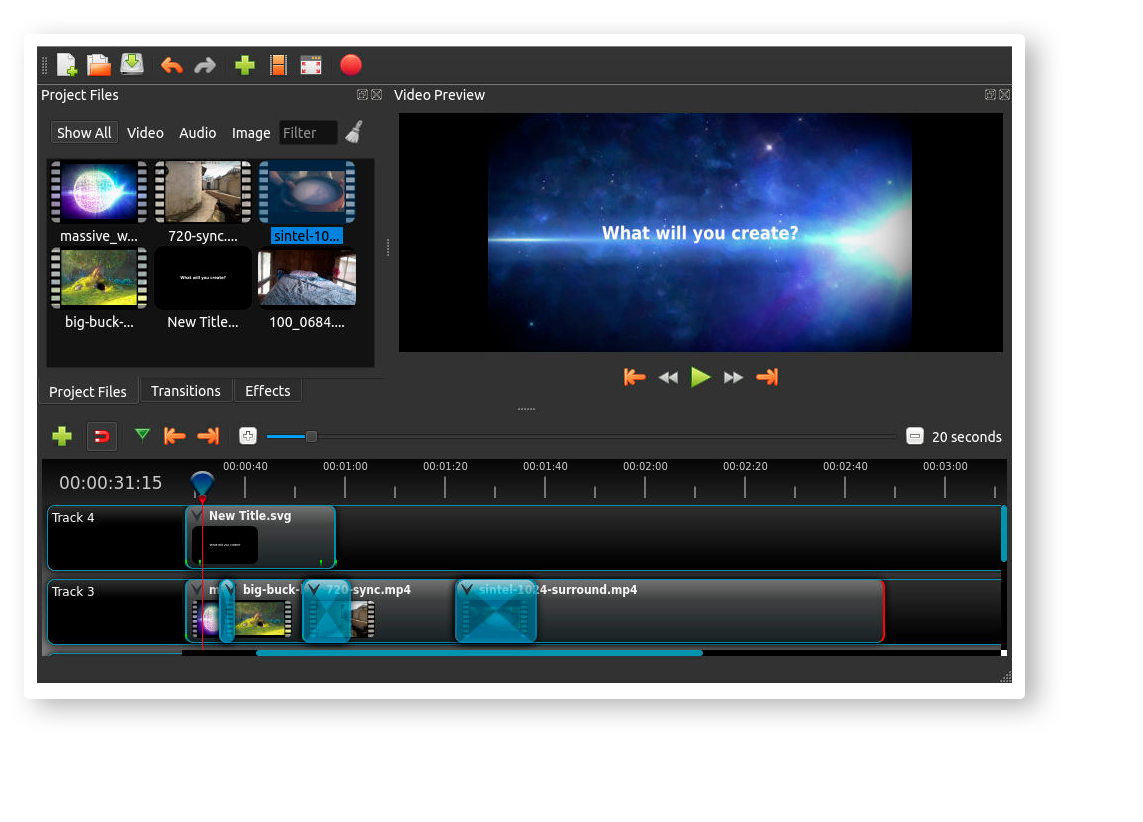
Its interface is basic but it has everything you need to have for a video editor. We find three main windows: the video viewer, the timeline (where the editing magic happens) and a side window with the material (videos, photos, music…), transitions and video effects.
Plus, it's as easy as clicking and dragging your material on the timeline to start editing your e-learning videos.
Basic functions to start ... and advanced functions to improve
OpenShot has all the basic functionalities that every video editor should have: unlimited tracks in the timeline, cut video, magnet, audio editing, video effects, transitions, add text add animated text ...
Even for those more expert in video editing, it allows using keyframes, creating animations, compositions and overlays of video and images, time tracing, etc.
Language
OpenShot is available in a wide variety of languages, including Spanish. As a curiosity, OpenShot is also in the process of translating into Galician, Basque and Catalan. You can access the translation process and help from this link.
Guides and community
OpenShot has a very extensive user guide, where it explains step by step all its functionalities and how to get the most out of the tool. It’s con is that it is only in English.
In addition, being an Open Source program, it has a very active community, both with developers and users.
You can find discussion forums where users can share their questions and receive tips for the program and editing.
In constant development
It is possible that you may run into some bugs or operating problems while using OpenShot, but don't worry, this Open Source video editing tool is in constant development and adding improvements every day.
You can keep up to date with updates on the OpenShot blog, or share any issues you find to help them develop the application.
Requirements
In general, all video editors work best with powerful computers with lots of memory, modern CPUs, and fast hard drives. These are the minimum requirements to optimally use OpenShot:
- 64-bit Operating System (Linux, OS X, Windows 7/8/10)
- Multi-core processor with 64-bit support
- 4GB of RAM
- 500 MB of hard disk space for installation
We hope that with these 7 reasons we have convinced you to use OpenShot as your main video editing tool for your online school. And if you are not convinced, you can also compare it with 10 other free and paid editing software.