fxzaixlearningfxzaixlearningfxzaixlearningfxzaixlearning
  • Plataforma LMS
    • LMS Comercial
    • LMS Training
    • Características LMS
    • Casos de uso
    • Precios LMS
    • Registro LMS
  • Formación corporativa
    • Programas 4.0
    • Formación Office
    • Programa de habilidades digitales
  • Foxize IA
    • Agentes IA
    • IAutor
    • MyTutor
    • Pasaporte IA
    • Aprende IA con IA
  • Learning Analytics
  • Blog
  • Nosotros
  • Accionistas
Español
Contacta
✕
Novedades Foxize LMS junio 2021
¿Por qué ofrecer formación a tus clientes? 

Foxize LMS june 2021 Update

Categories
  • Sin categorizar
Tags
  • Foxize LMS

Viewing PDF in the course

A new type of material is now available for your courses: Document.

This material includes the document download option (like the one there was until now) or the PDF viewer option.

By selecting the document download option, the student can download any type of document (pdf, word, ppt, excel, image, etc).

With the PDF viewer option, students will be able to view the material directly embedded in the materials, without having to download anything. Of course, only PDFs can be viewed.

Course PDF viewer saves reading progress and counts towards course completion. In addition, in the case of a sequential course, students will not be able to access the following material if they have not finished reading the PDF.

The PDF viewer has tools to zoom and view it in full screen.


Mass registration of users by CSV

Now you can register a large number of new users simultaneously through a CSV file.

To do this, you will have to access Daily Management> Users and click on the button "Massive CSV registration".
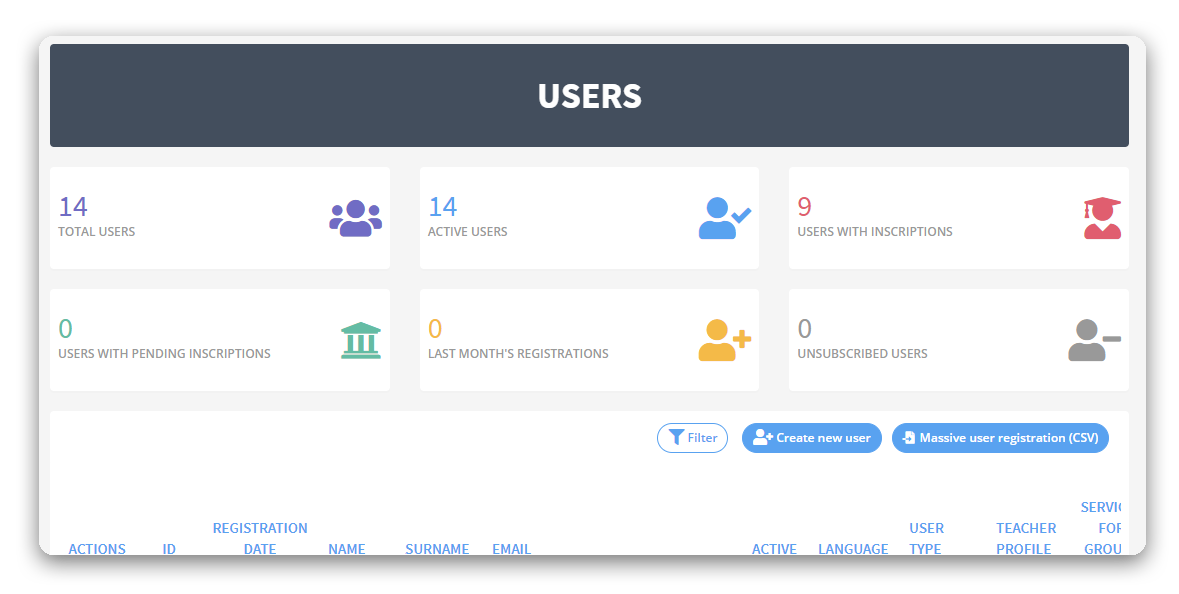
When you click, a modal will appear with all the information necessary to load the CSV file.

The file must be prepared in an Excel, with the columns: Name, Surname, Email, Password, and extra fields if it had in the registry.

If any extra information is requested in the registration form, such as department, position and / or city, they must be added with the exact name in the Excel column.

In the case of having drop-down form fields, the Excel options must exactly match those indicated in the platform configuration.

As many columns as there are extra fields in the form must be added.

The Excel file must be saved in CSV format (comma delimited) (. Csv)

Once the CSV is loaded, a screen will appear to indicate the relationship of the Excel fields with the fields of the record.
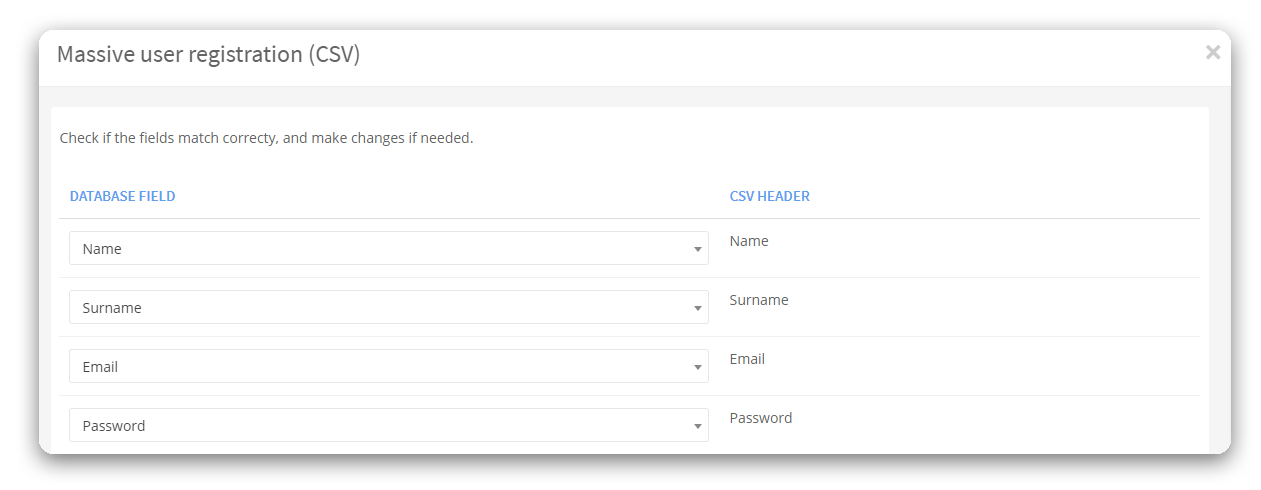
Once the users have been uploaded to the system, it will ask if you want to send the registration confirmation email to the users.


Download of student certificates by backoffice
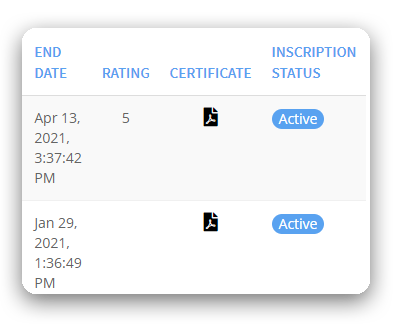
Before, to download a student's certificate, you had to simulate a session on the platform with their username. Now you can do it from the administrator, accessing Daily Management>Course Capacity or in the user's CRM.


Other improvements

  • Optimization and management of drop-down fields in the registry.
  • Multi-language settings.
  • Corrections of misprints in English.
  • Improved FUNDAE report with personalized user registration data.
  • Fixed bug in csv uploads.
Equipo Foxize
Equipo Foxize

Related posts

9 de junio de 2026

Vidext vs. Synthesia: Nuestra experiencia real digitalizando formación corporativa


Read more
4 de junio de 2026

¿Se mueve tu empresa a la velocidad del mercado? El peligro del ‘Talent Velocity Gap’ en 2026


Read more
2 de junio de 2026

Tutorial Vidext: De un documento a un curso en vídeo interactivo 


Read more

Comments are closed.

_Soluciones

Plataforma LMS
Formación corporativa
Foxize IA
Foxize Data

_Recursos

Blog
Webinars

_Nosotros

Equipo
Contacto
Foxize Lab

_Únete a nuestra newsletter
  Thank you for Signing Up
Por favor rellene los siguientes campos

1,true,6,Contact Email,21,false,1,First Name,21,false,1,Last Name,2

Al enviar este formulario, autorizo el tratamiento de mis datos personales
(nombre y correo electrónico) con la finalidad de recibir comunicaciones,
novedades y contenidos informativos por correo electrónico.

© 2026 Foxize.com

Políticas de privacidad | Políticas de cookies | Aviso Legal | Políticas de Seguridad

Contacta
Español
  • No translations available for this page

Utilizamos cookies propias y de terceros para analizar el uso de la web,
personalizar contenidos y mejorar nuestros servicios. Puedes aceptar todas las
cookies, rechazarlas o configurar tus preferencias en .

Foxize
Powered by  GDPR Cookie Compliance
Resumen de privacidad

Esta web utiliza cookies para que podamos ofrecerte la mejor experiencia de usuario posible. La información de las cookies se almacena en tu navegador y realiza funciones tales como reconocerte cuando vuelves a nuestra web o ayudar a nuestro equipo a comprender qué secciones de la web encuentras más interesantes y útiles.

Cookies estrictamente necesarias

Las cookies estrictamente necesarias tiene que activarse siempre para que podamos guardar tus preferencias de ajustes de cookies.

Cookies de terceros

Esta web utiliza Google Analytics para recopilar información anónima, tal como el número de visitantes del sitio, o las páginas más populares.

Dejar esta cookie activa nos permite mejorar nuestra web.

Política de cookies

Más información sobre nuestra política de cookies